 Gil Cleber Barboza
Your smart plugs, without the cloud detour.
A clean, self-hosted dashboard for Tuya/SmartLife plugs with energy metering. It talks to the plugs on your LAN first and uses Tuya Cloud only as a fallback — web and native app on the same Python core.
- Python
- Flask
- Flet
- Tuya
- SQLite
- MIT
See it in action
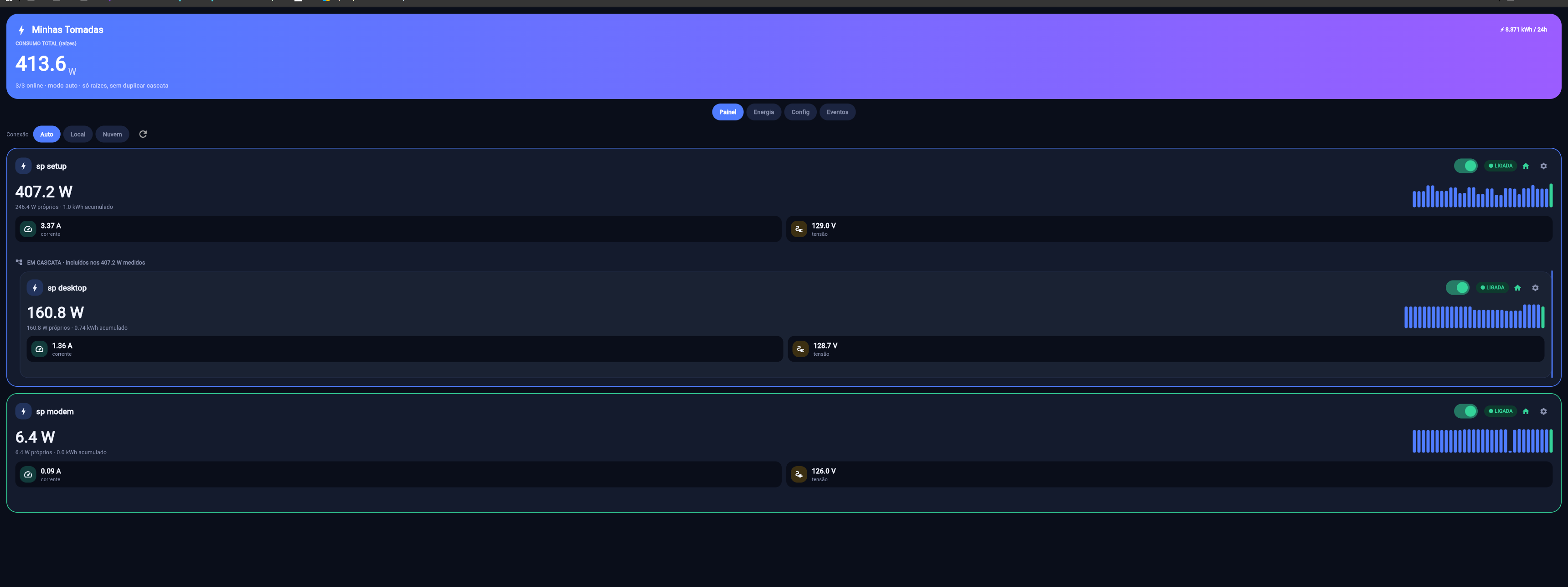
Three plugs, cascade totals and live energy.
What it does
Local first, cloud when you are away.
-
Live panel
A card per plug: switch, status, measured W vs own W, V, A, accumulated kWh, origin (local/cloud), cascade, countdown, protections and logs.
-
Charts that stay
Consumption minute by minute (2h), hourly (24h), daily (7d/30d) and monthly (12m), using the same cascade language.
-
Physical cascade
Mark a plug as a child of another. The app shows measured vs own watts and sums only the roots — no double counting.
-
Auto, local or cloud
LAN first with cloud fallback, local-only on the same Wi-Fi, or cloud-only when you are away. Choose per request.
-
In-app setup
Save Tuya credentials, discover devices, scan the network, import 7 days of history, edit plugs, set the cascade and test a reading.
-
History that lasts
SQLite keeps raw samples for 60 days and hourly/daily aggregates forever; cloud backfill fills the first 7 days.
-
Native Flet app
The same Python core and visual language as a desktop window — build for Windows, Android, macOS, Linux or iOS.
-
Local-first privacy
Secrets (
devices.json,cloud.json,history.db) are gitignored; control traffic goes to the plugs on your LAN.
Connection modes
One app, three paths to the plug.
| Mode | When to use | What you get |
|---|---|---|
auto (default) |
Everyday use | Tries LAN first, falls back to the cloud. |
local |
Same Wi-Fi, no internet | Millisecond responses, no quota; LAN only. |
cloud |
Away from home | Remote status and commands, device info, functions and logs. |
Diagnostics: GET /api/modes and GET /api/health. The mode can
be selected per request with ?mode=auto|local|cloud.
Quick start
Python, requirements and a browser.
pip install -r requirements.txt

# Web dashboard
python app.py            # http://localhost:5000

# Native window (Flet)
python app_flet.py
From your phone on the same Wi-Fi, open http://<IP-do-PC>:5000.
First setup
Three steps, then the app remembers.
1. Create a project at https://platform.tuya.com/ (IoT Core, free)
   and link your SmartLife account under Devices → Link App Account.
2. Open /setup: save Access ID/Secret → discover devices →
   scan the network → adjust names/versions → save the plugs.
3. If the link says "Sem permissão", follow the checklist in COMO_USAR.md.
The app speaks directly to the plugs on the LAN; the cloud is the fallback and the source for remote info/logs and the initial 7-day backfill.
Build the native app
Flet packages the same core for each platform.
flet build windows      # Windows installer
flet build apk          # Android
flet build macos        # macOS
flet build linux        # Linux
flet build ipa          # iOS (on a Mac)
See PUBLISH.md for the full build notes.
Links
- Source & setupgithub.com/thepaneb/my-tuya-home
- FEATURES.mdMode × feature matrix and the cascade rules
- COMO_USAR.mdStep-by-step setup and Tuya troubleshooting
- PUBLISH.mdNative builds for each platform
Personal, self-hosted project. Tuya/SmartLife credentials and device keys stay on your machine and are gitignored.