




Why use it
Native Test Explorer
Suites and tests appear in the testing view; run by test, suite, file or folder.
CodeLens & shortcuts
Run and Run-with-Coverage buttons over
%suite/%test, plus aCtrl+Shift+Ushortcut family.Visual coverage
Colored gutters per line and per-file statement/view coverage in the Coverage tab.
PL/SQL debugger
Breakpoints and step debugging of utPLSQL tests via
DBMS_DEBUG(native Debug Adapter).Oracle-direct execution
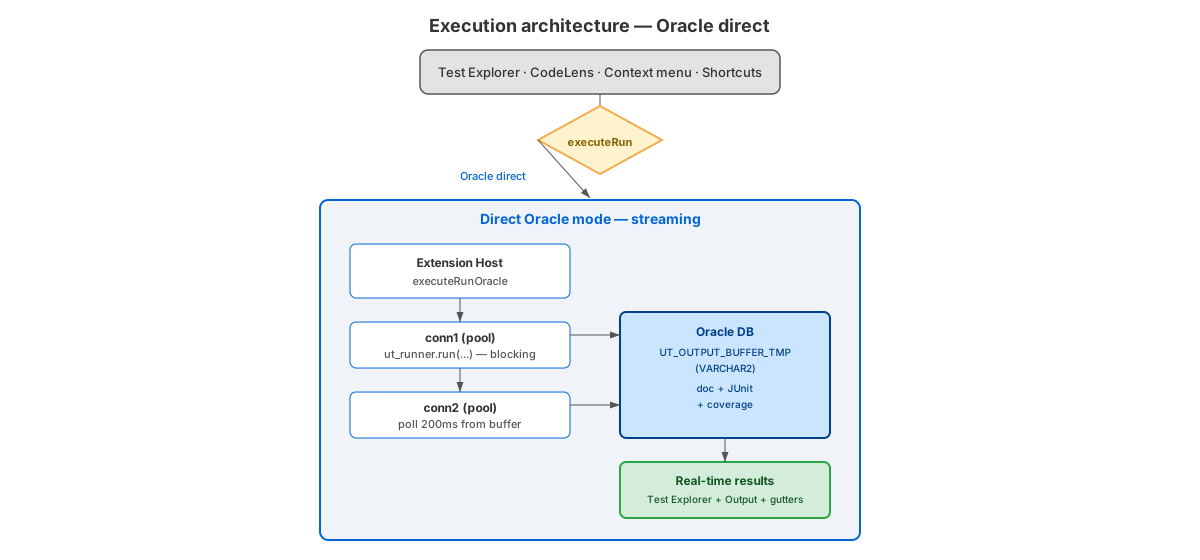
Real-time streaming through
node-oracledb— no waiting for the batch to finish.Schema-aware tree
Organize tests by Schema > Package > Suite > Test, with lazy loading for large schemas.
Connection profiles
Switch between DEV/TEST/PROD environments; passwords stay in SecretStorage.
24 UI languages
Follows the VS Code display language, from pt-BR to 中文 and more.
Get started
- Install the extension from the VS Code Marketplace.
- Have an Oracle database with the utPLSQL framework (
UT3) installed. - Configure a connection and open a
.pkssuite — tests show up in the Test Explorer.
Documentation
Full guides live on the project wiki: installation, connection, quick start, coverage, debugger, settings and troubleshooting.
FAQ
What is utPLSQL Test Runner?
A VS Code extension that runs, debugs and covers utPLSQL (Oracle PL/SQL) unit tests against an Oracle database. Suites and tests appear in the native Test Explorer, with visual test coverage and a PL/SQL debugger.
Which VS Code and Oracle versions are supported?
VS Code 1.101+ and Oracle Database 12.2+. The thin driver
(node-oracledb) works out of the box; optional thick mode (Oracle Instant
Client) covers environments that require Native Network Encryption.
Do I need the utPLSQL framework installed in the database?
Yes. Install the utPLSQL framework
(UT3) in the Oracle database — per-schema or shared install — and grant the
privileges the extension validates during setup.
Does it provide test coverage?
Yes. Statement and view coverage with colored gutters per line and per-file percentages in
the Coverage tab. Coverage requires GRANT EXECUTE ON DBMS_PROFILER.
Can I debug PL/SQL tests?
Yes. Set breakpoints and step through utPLSQL tests with the native PL/SQL debugger
(DBMS_DEBUG). Requires DEBUG CONNECT SESSION and
EXECUTE ON SYS.DBMS_DEBUG.